




About the App
AppClose Pricing in 2026
AppClose is $7.99 a month on the web or $8.99 in the app, with prepaid plans from $5.99 a month and a 60-day free trial. Checked 2 November 2026.
There's a lot to keep track of with kids in two homes. The Packing List, Lists, and To-Dos gather it all in one place — so it's always clear what needs to be done, and who has done it.
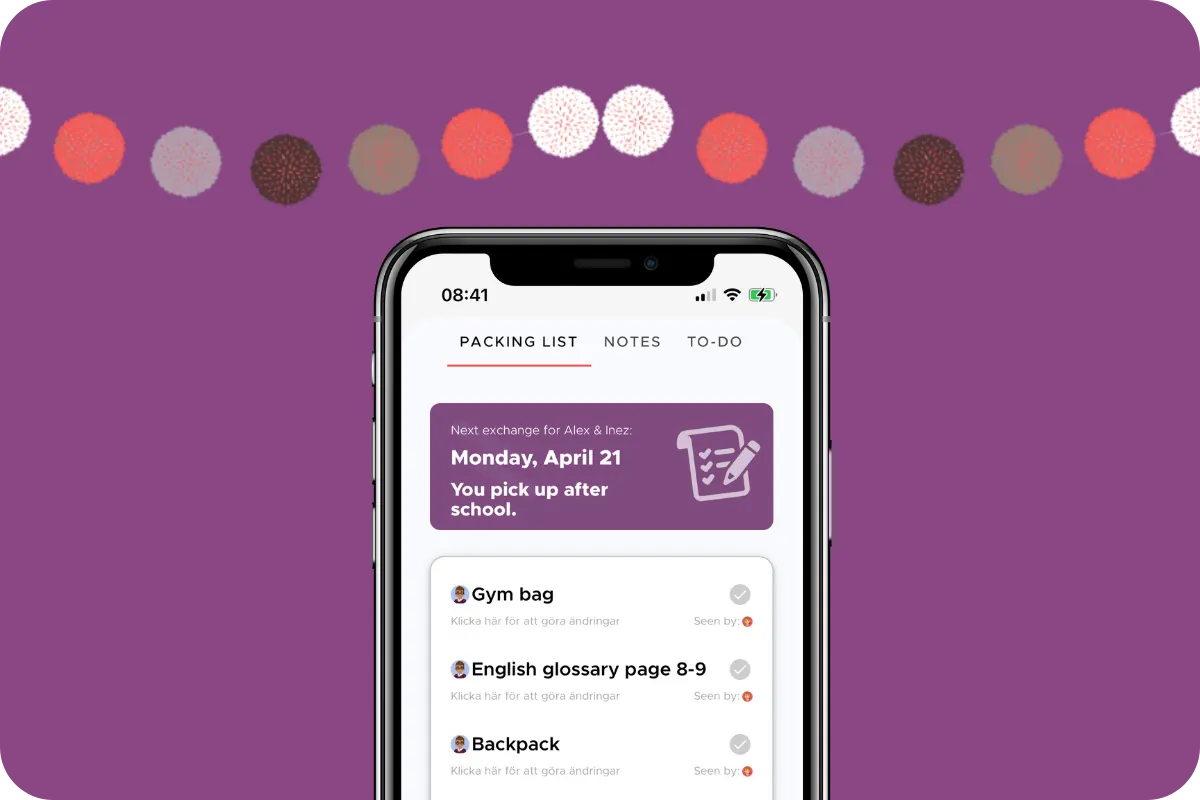
In the Packing List, you add what your child needs to bring at each transition between homes — the tablet, soccer shin guards, the riding helmet, and other must-haves.
Before the handover, you or your child check off each item as it’s packed, and your co-parent gets an instant notification that it’s ready. No more reminding or nagging about the stuff. And if something is left unchecked, the app reminds you there are still items to pack.
The list is generated fresh for each transition, so you never need to empty it — the app does that for you. Sweet!
Tap the plus button to add your child’s digital wishlist, so both of you can see it and weigh up good birthday gifts. Just make sure you don’t share that list with your child! You control this by marking the avatars that should see the list — those shown in color can see it, unmarked ones cannot.
When you buy the game, the soccer shoes, or the skateboard, check the box, and everyone with access to the list sees the update immediately. And don’t forget: you can add the expense to the Finance Assistant to split it!
Want a list just for yourself? Unselect every avatar except your own when you create it — then only you will know it exists and can view its contents.
Lists can be deleted, unlike chat threads, which can only be archived.
Here you or your co-parent add tasks related to the children — a doctor’s appointment to book, a present to buy for a party — and set a deadline for when each task needs to be done.
Once the appointment is booked or the purchase made, tap the small marker on the right and the task is marked as done. The other person instantly sees that it’s complete. No more reminders or nagging!
Elisabeth Scholander Family law attorney and mediator, specialized in conflict resolution for families
27 August 2026
"The turning point came when we found the Co-parenting app. There's less fuss and both of us have a better handle on things. It feels so great!”
"Thank you so much for this app, it has finally gotten us to communicate!”
About the App
AppClose is $7.99 a month on the web or $8.99 in the app, with prepaid plans from $5.99 a month and a 60-day free trial. Checked 2 November 2026.
About the App
What OurFamilyWizard, AppClose, TalkingParents and Co-parenting cost in 2026: plan prices, free trials, who has to pay, and what each tier includes.
About the App
Looking for an OurFamilyWizard alternative? AppClose, TalkingParents and Co-parenting compared on price, who pays and features — and when to stay put.